I’ve had a lot of calendar invites through recently. They’ve all been welcome and they are for meetings that I’m looking forward to.
The downside is that I have to click into some of them just to understand what they are or to see who they’re with. If you send your invites with things like “catch up” as the title then this is definitely for you!
I’m not saying I’ve got the invite totally nailed and yet I do think I do a pretty good job at sending a useful and easy to read calendar invite. I used Google for calendar management, so appreciate that Outlook etc may differ slightly from what I’m showing here.
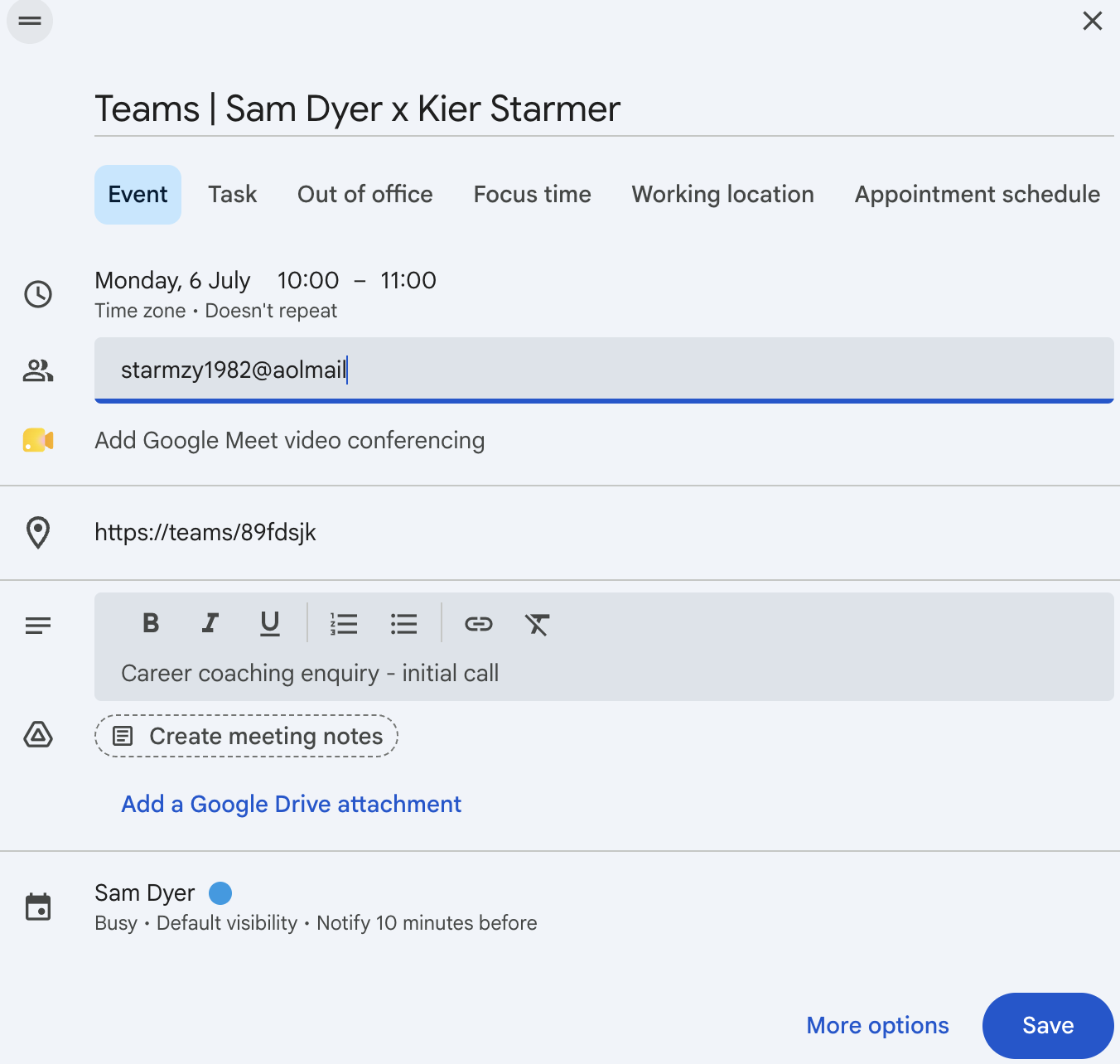
Here are the top 3 things I utilise:
Title
Location
Notes
This is the format I use for the Title:
[Meeting type] | Sam Dyer x [Their name]
The meeting type could be in person, phone, or Zoom/Teams/Google Meet. I include this so that we both know what type of meeting it is and if travel time needs to be added.
I include my name and place it first so that the other person can easily see who the meeting is with on their calendar.
In location, I put the location! If that’s physical, it’s an address. If it’s online, it’s the meeting link.
In notes, I add any brief information that I think would be useful for the meeting, such as the purpose.
None of it is difficult or time consuming and yet until I gave it some thought, I’d just send out something generic. This is easy to do and is highly impactful!